

A vendor portal is a central platform for vendors or suppliers to communicate, collaborate, and transact with an organization. The specific features and functions can vary depending on the organization’s needs and the vendor management process. In this blog post, we will discuss the different vendor portal functionalities available.
What are your vendor pain points?
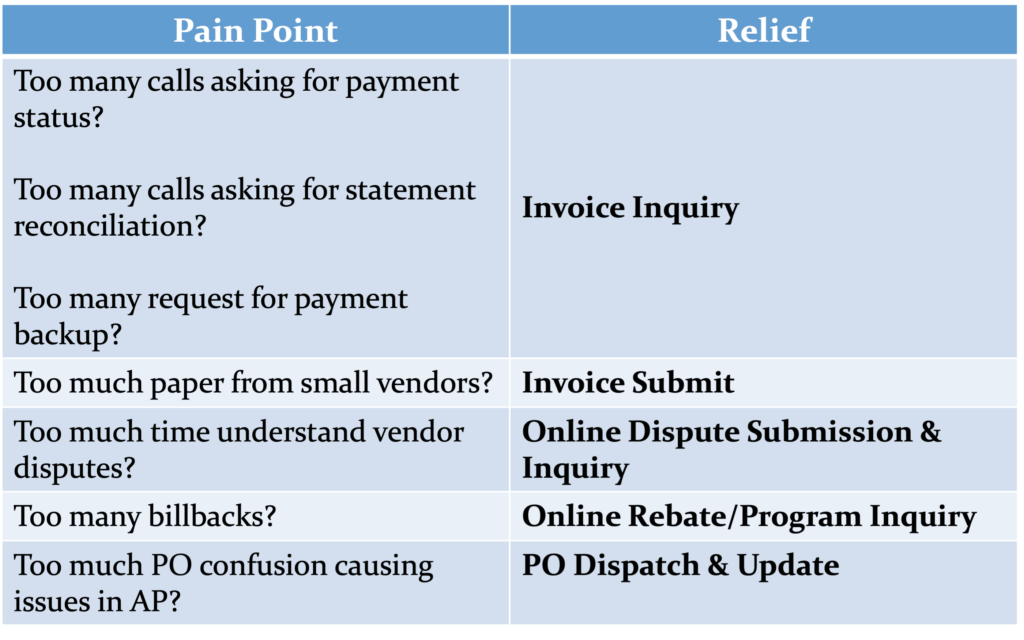
With the different functions of a vendor portal in mind, make an informed decision based on your organization’s needs and decide which functionalities will deliver the biggest bang for the buck. Here are some other things to keep in mind during your technology search:
- Add functionality to your portal based on YOUR organization’s needs
- What are the most common vendor portal functions?
- Select functionality that drives the maximum value to your organization
- Don’t solve ALL the problems; just solve the first one, then move on to the next
- Progress over perfection
What are some of the different functions of a vendor portal?
Onboarding Functionality
- Vendor Registration: Vendors can register their company and provide necessary information, including contact details, business credentials, certifications, and product catalogs.
- Profile Management: Vendors can manage their profile information, including updating contact details, uploading company logos, and maintaining accurate records.
- Document Sharing: Vendors can upload, download, and share important documents such as contracts, agreements, invoices, and compliance certifications. This helps ensure all necessary documentation is readily accessible and up to date.
- Training and Support: The vendor portal may offer resources such as training materials, guidelines, and FAQs to assist vendors in understanding the company’s processes, policies, and requirements.
Management Functionality
- Order Management: Vendors can view and manage orders placed by the company, including order details, quantities, delivery dates, and order status updates. They can also acknowledge, accept, or reject orders and update delivery or shipping information.
- Inventory Management: Vendors can manage their inventory levels, update stock availability, and provide real-time information about product availability.
- Product Catalog: Vendors can upload and maintain their product catalog, including product descriptions, pricing, specifications, and images. This allows the company to browse and search for products easily.
- Invoice and Payment Management: Vendors can submit invoices electronically, track payment status, submit and track disputes, and view payment history.
- PO Dispatch & Update: Companies can automate the dispatch of POs to vendors as well as request and receive responses via the portal. Buyers can also automate the request for updates for critical orders, such as ship date, quantity, delivery date, etc.
- RFx Dispatch & Update: Automate RF(X)s dispatch to vendors and request and receive responses and updates via the portal.
- Self-Service Tools: Any vendor portal or supplier portal should include self-service features, allowing vendors to perform tasks independently, such as updating account information, managing user access permissions, and generating reports.
Reporting Functionality
- Performance Tracking: The portal may include performance metrics and analytics, allowing vendors to monitor their performance, track sales, and analyze order history. This can help identify areas for improvement and make data-driven procurement and vendor management decisions.
- Reporting and Analytics: The portal may generate reports on things like order volume, sales trends, inventory turnover, and vendor performance. This information can help both parties make informed decisions.
- Onboard: Register, train, collect information, and share documents with vendors.
- Manage: Maintain and upload products, pay invoices, and dispatch POs.
- Report: Track performance metrics.
Get Started With Vendor Portals
It’s important to note that vendor portal functionality can vary widely depending on the organization’s needs, industry, or complexity of vendor management processes. What does not vary based on functionality is the need for strong security and monitoring of critical data. ICG partners with Sysdig and AWS to ensure all of our cloud-hosted portals provide the highest levels of security.
A vendor portal serves as a central platform for vendors and delivers tremendous value to your company by promoting self-service, assisting in vendor management initiatives, and providing a communication vehicle between you and your vendors 24/7. This reduces the burden of non-value-added activities for your staff and supports remote workforce situations.
Contact ICG today to start a conversation on how your organization can benefit from various aspects of vendor portal functionality. Or request a demo of our vendor portal solutions and see for yourself how your company can take advantage of them. For a quick view of ICG’s solutions, view this short video. Check out ICG’s other vendor management-related solutions.